One-click capture
No manual scrolling or image assembly.
Capture the whole page.
Capture an entire scrollable webpage as one PNG with a single click—without manually scrolling, stitching images, or uploading page content to a PageSweep server.
One click from webpage to complete PNG.
Navigate to the webpage you want to capture.
PageSweep scrolls through the page, captures each section, and assembles the complete image.
The finished image downloads automatically to Chrome's configured download location.
No manual scrolling or image assembly.
Captured frames are assembled inside the extension.
A smooth blue-to-purple indicator shows that PageSweep is working.
The webpage returns to its starting position after capture.
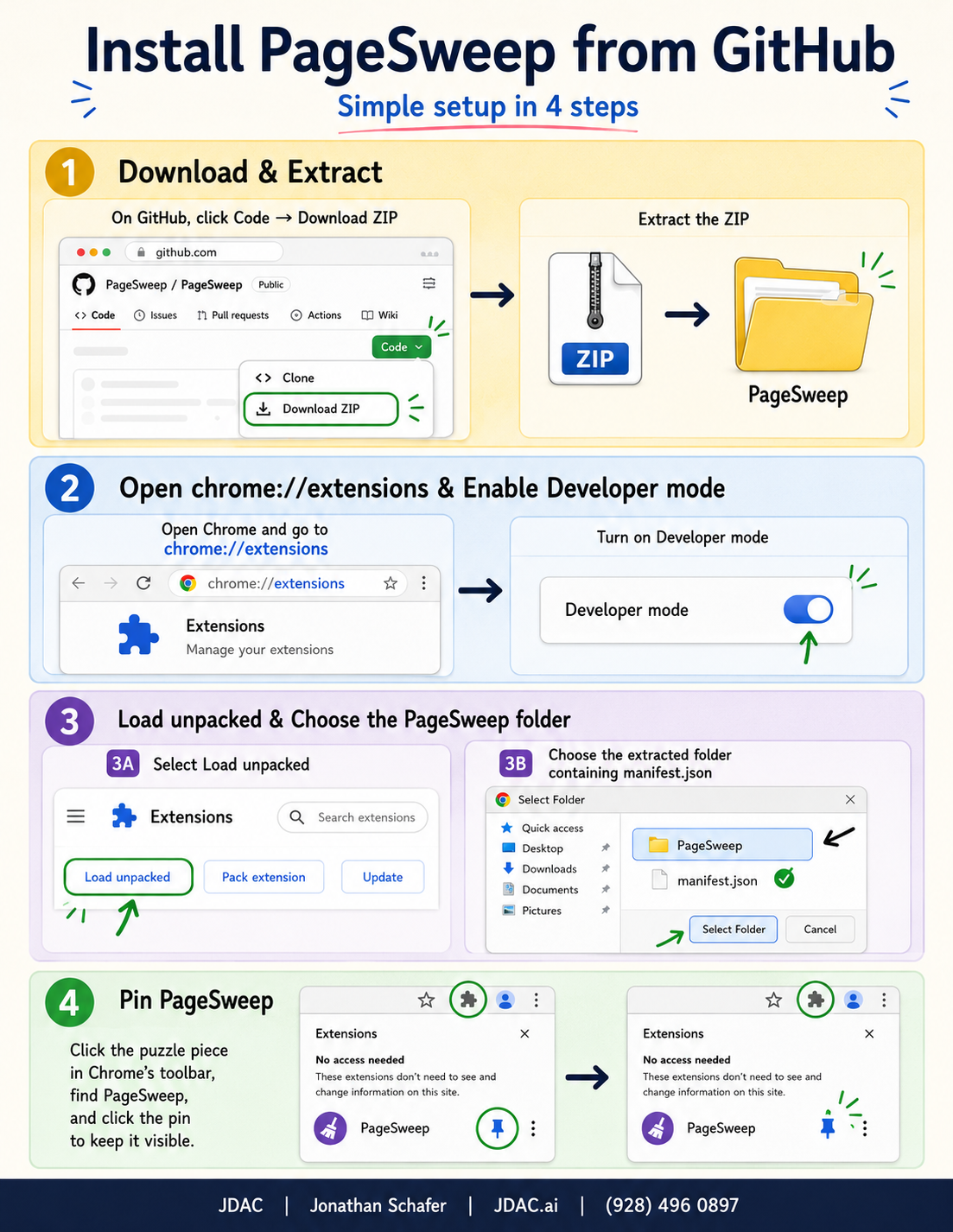
PageSweep is currently installed as an unpacked Chrome extension. A Chrome Web Store release is planned.
Download PageSweep on GitHubPageSweep does not upload captured webpage content to a PageSweep server. The finished PNG is saved through Chrome to your configured download location.
Try the PageSweep public beta and turn a scrolling webpage into one complete PNG.